vikram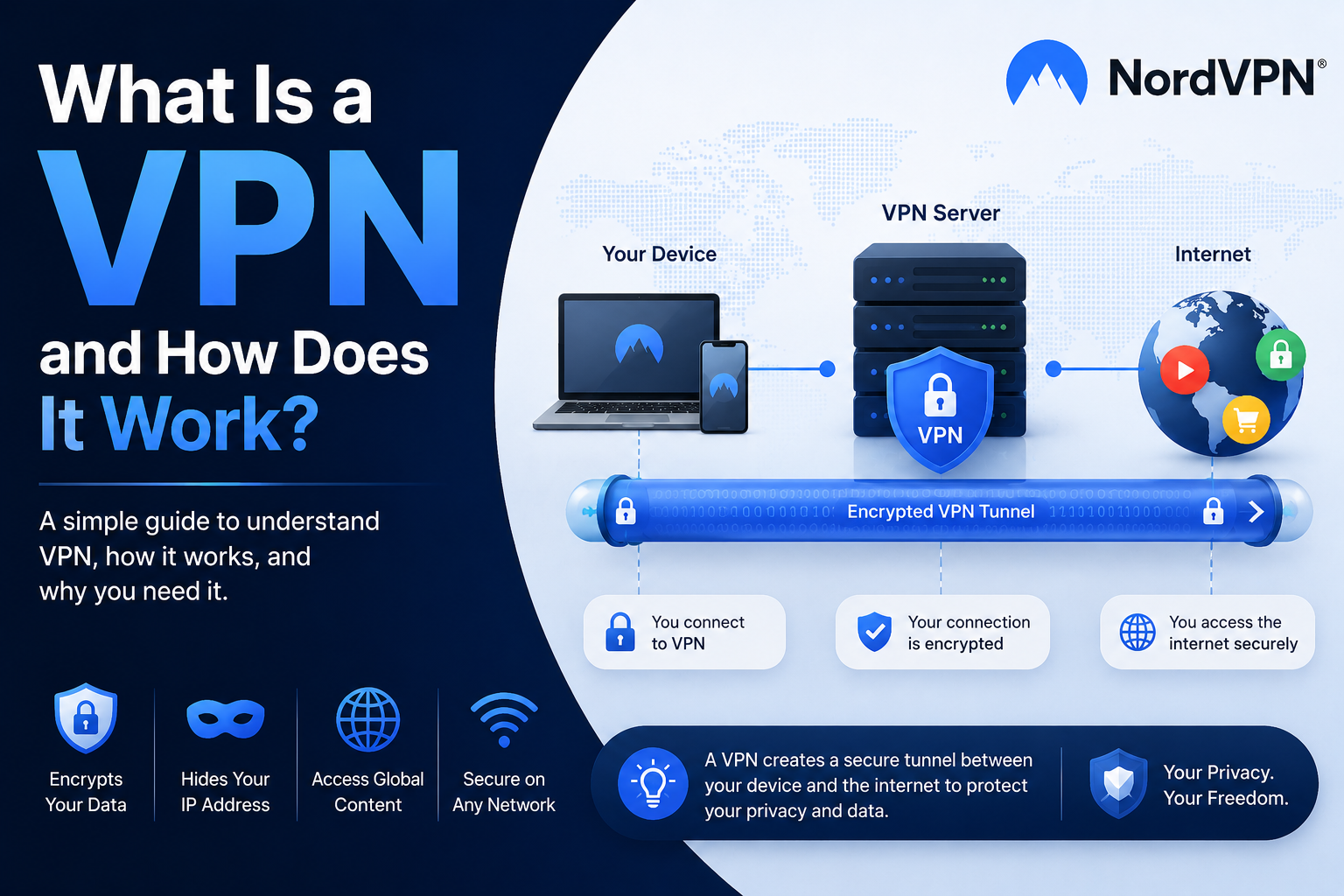
A VPN is a technology designed to make an internet connection more private and secure. But what exactly does a VPN do, how does a VPN connection work, and why do people use one?
A VPN can encrypt internet traffic, route it through a VPN server, and hide the user’s original IP address from websites and online services.
What Is a VPN?
VPN stands for Virtual Private Network.
A VPN creates an encrypted connection between your device and a VPN server. Your internet traffic passes through this connection before reaching the websites or services you use.
This works like a secure tunnel between your device and the internet. The VPN server acts as an intermediary, while websites generally see the VPN server’s IP address instead of your original IP address.
How Does a VPN Work?
When you connect to a VPN, your device establishes a connection with a VPN server.
Your internet traffic is encrypted before being sent through the VPN connection. This makes the information much harder for outsiders to intercept and read while it is traveling through the connection.
The VPN server then communicates with the websites and online services you’re accessing.
This means a website doesn’t simply receive your original IP address. Instead, it sees the IP address associated with the VPN server.
What Does a VPN Hide?
One of the main things a VPN can hide is your original IP address.
Your IP address can provide information about your general network and location. When you connect through a VPN server, websites see the server’s IP address instead.
A VPN also encrypts traffic between your device and the VPN server.
However, a VPN does not make you completely anonymous. Cookies, browser fingerprinting, malware, and other tracking technologies can still be used to identify or track users.
What Is a VPN Used For?
There are several common VPN use cases.
Secure Public Wi-Fi
Public Wi-Fi networks in airports, hotels, cafés, and other locations can create security risks.
A VPN encrypts traffic through the VPN connection, making it more difficult for someone on an unsecured network to intercept your information.
Hide Your IP Address
A VPN replaces your visible IP address with the IP address of the VPN server.
This can make your online connection more private and can prevent websites from seeing your original IP address directly.
Access Different Server Locations
VPN providers typically operate servers in multiple countries.
By connecting to a server in another country, your internet connection can appear to originate from that server’s location.
Bypass Some Restrictions
VPNs can sometimes help users access websites or services that are restricted on a particular network or location.
However, users should always comply with local laws and the terms of the services they use.
Should You Use a VPN?
A VPN can be particularly useful if you regularly use public Wi-Fi, travel frequently, want additional privacy, or need access to VPN servers in different locations.
It provides an additional layer of protection rather than making every aspect of your online activity completely anonymous.
How to Choose a VPN
When choosing a VPN, look at:
- Encryption
- VPN protocols
- Server network
- Connection speeds
- No-logs policy
- Customer support
- Kill switch
- Available applications
- Specialty features
The VPN provider should also have a privacy policy that clearly explains how user data is handled.
The supplied NordVPN brief recommends looking for strong protocols, robust encryption, a no-logs policy, a useful server network, easy-to-use applications, fast connections, and reliable support.
NordVPN as a VPN Option
NordVPN offers OpenVPN, IKEv2/IPsec and NordLynx protocols and has dedicated apps for major platforms.
According to the supplied material, it has 9,500+ servers across around 150 countries and supports 10 simultaneous connections.
It also offers specialty servers such as Double VPN, Onion Over VPN, obfuscated servers, P2P and Dedicated IP.
Want to Try NordVPN?
If you’re looking for a VPN with a large server network and multiple security features, you can check NordVPN here:
https://go.nordvpn.net/aff_c?offer_id=266&aff_id=154507&url_id=710